Thursday, November 15, 2012

Grade 5: Nov 15 (In-Class Work)

Stop Smoking!

Name:
Grade:
Date:

 
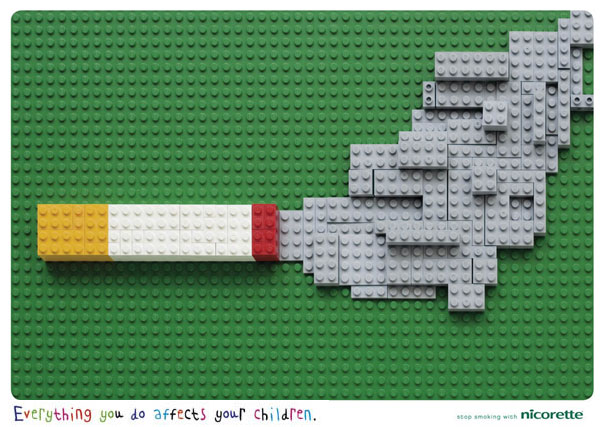
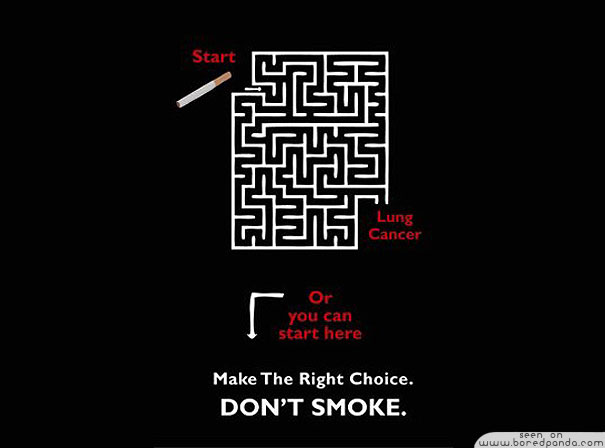
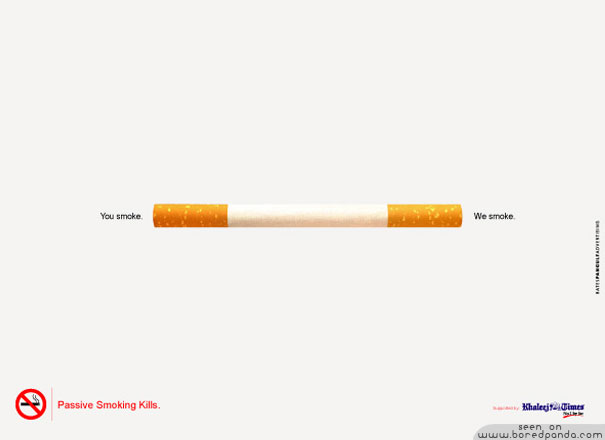
Task: Examine this anti-smoking advertisement. 


Answer the following questions in a Microsoft Word document.
Name it: November 15, 2012. 
Save it in your Grade 5 Folder.
Answer in complete sentences.


Who is the intended audience? How do you know?

Who created this poster? How do you know?

What is the intended purpose? How do you know?

What is the message being communicated? Be specific in your answer. 

How does the design communicate the message?

Do you think it is possible to design it differently but communicate the same message? How would you do this?


Grade 5: Nov 15

Stop Smoking!

Let's look at these anti-smoking advertisements. 
Can we identify: 

  • the intended audience
  • intended purpose
  • message
  • the design (and text elements)


Monday, November 12, 2012

Using Microsoft Word

Name:
Grade:
Date:
 
Using Microsoft Word
 
Before we can begin working on our posters we have to know how to use basic functions in Microsoft Word.
 
Task: Copy and paste this document into a Microsoft Word file. Put your name, grade and the date at the top. Save is in your Grade folder. Follow the instructions below.
 
Instructions: In the space below.
 
Insert a Textbox.
 
Add a border and filling to your text box. Experiment to see what creative things you can do with your text box.
 
Add text to your text box.
Change the font of your text.
Experiment to see how you can change the style of your words.
 
Insert a Shape
 
Add a shape. Experiment to see what creative things you can do with your shape. Test out changing the border and filling.


Grade 4: Nov 13

Name:
Grade:
Date:
Let's Create a Poster!

You have been selected to give a presentation to a group of Grade 3 students about what makes your class wonderful! You want people to know the wonderful things you are doing in your class and you want to make them with they were in it! What makes your class special? Why would someone want to be apart of your class?

Use your understanding of intended audience and intended purpose to create a poster that advertises your class to Grade 3 students.

You will need to include the following:
  • Teacher
  • Number of students
  • Your favourite subject
  • Your favourite project so far
  • Trips or other activities you have done as a class

You need to design your poster in a way that makes Grade 4 seem fun and interesting!
  • Use exlamation marks
  • Use big catchy phrases
  • Include details
  • Include pictures
  • Be positive

Here is your task. Copy and paste this blog post into a Microsoft Word Document. Put your name, grade and date at the top. Answer the following planning questions and print it out. You must do this before you begin working on your poster.

Planning questions:
Who is the intended audience?
What is my intended purpose?
What is my favourite subject? Why?
What is my favourite class project? Why?
Why is my teacher wonderful?
What other wonderful things do I like about my class?


Grade 5: Nov 13

Name:
Grade:
Date:
 
 
Let's Create a Poster!

You have been selected to give a presentation to a group of Grade 4 students about what makes your class wonderful!  You want people to know the wonderful things you are doing in your class and you want to make them with they were in it! What makes your class special? Why would someone want to be apart of your class?

Use your understanding of intended audience and intended purpose to create a poster that advertises your class to Grade 4 students.

You will need to include the following:
  • Teacher
  • Number of students
  • Your favourite subject
  • Your favourite project so far
  • Trips or other activities you have done as a class

You need to design your poster in a way that makes Grade 5A seem fun and interesting!
  • Use exlamation marks
  • Use big catchy phrases
  • Include details
  • Include pictures
  • Be positive

Here is your task. Copy and paste this blog post into a Microsoft Word Document. Put your name, grade and date at the top. Answer the following planning questions and print it out. You must do this before you begin working on your poster.

Planning questions:
 
 
Who is the intended audience?
 
What is my intended purpose?
 
What is my favourite subject? Why?
 
What is my favourite class project? Why?
 
Why is my teacher wonderful?
 
What other wonderful things do I like about my class?


Grade 3: Nov 13

Name:
Grade:
Date:
Let's Create a Math Poster!


The Grade 3's love Math and Computers! We are going to create Division posters in Media Literacy to help us develop our Math skills!


Here is your task.

Copy and paste these instructions in a Microsoft Word file.
Put your Name, Grade and Date at the top.
Save your folder in your Grade 3 folder.

Print it and then answer the questions using pencil.


Planning Questions:


1. What is the division? Use pictures, words and numbers to explain.


2. Write out the division formula.


3. Complete the division formula on the board below. Include all the steps.


4. When do you use division in your life?


5. Why is division fun? :)


Grade 7 Coureur de Bois Glogster Information


Coureur de Bois Glogster

 
You will find all the information you need to create your Glogster in this blog post. Check it weekly (each Monday) for updates.
 
*Reminder: You must create a log of the images and videos you use. 

Here is a sample:

Type of Media (i.e. photograph, video, picture)
Source (URL)
Date Located


Grade 7: Online Interactive Poster Planning Sheet
Instructions: Answer these questions before beginning to work on your Glog.
Who is the intended audience?
What is the intended purpose?
What information do I need to address the intended purpose?
How will you design your poster to target your specific audience and purpose?
What resources can I use?
What conventions of a Glog will I use?
What techniques will I use?
How will I manage my time to work effectively?
Write a list of things you would like to include in your poster below.
Create a penciled/electronic draft version as well that must be submitted to Miss Ali before you begin working on your Glog online. This draft should consider all of the Expectations.   
Reflection Question: What do I think will be most difficult about creating my Glog? What strategies can I use to help me?

Grade 7: Online Interactive Poster Expectations
The life of a coureur de bois was dangerous and exciting. Review the material on pages 37-38 of your text and create a 'help wanted' ad for this unique job. Think carefully about the skills and experiences required.
Use the technical skills you have developed on Edu.glogster.com and understanding of Media Literacy concepts: intended audience and intended purpose, to create an online interactive poster that advertises the job of a coureur de bois.
To be successful in this assignment follow the guidelines outlined below:
1.     Design you poster to address a specific target audiwn
  
2.     Follow all of Miss Li's expectations.
3.     Include the following conventions
·      Title, subtitles
·      Text
·      Relevant pictures
·      Links
·      Youtube video
·      Self-created video (this will be done last in the lab)
o  Introducing the job
o  Explaining important and interesting information about this job

Make sure to make a log of the images you use in a Microsoft Word document. 

Here are some examples of modern job advertisements: